
Xhorse Key Tool Max File Make Key Funtion Use Tips


Xhorse Key Tool Max File Make Key Funtion Use Tips

Step by step to use xhorse key tool max file make key function.

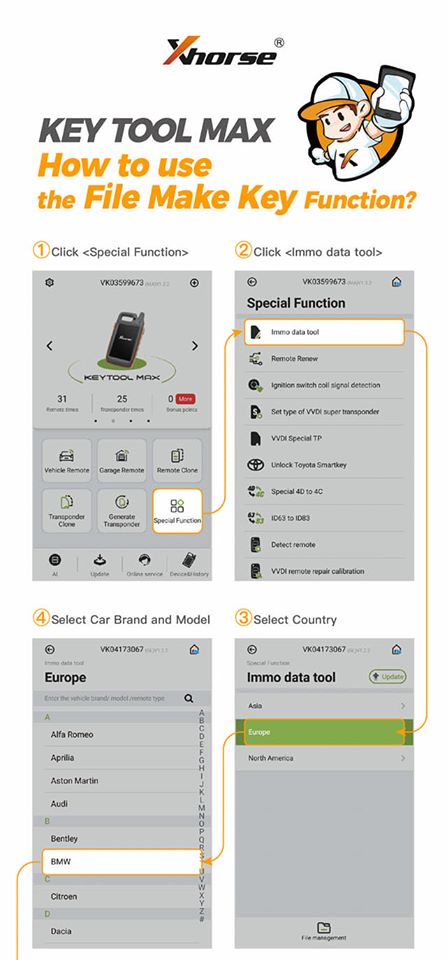
1.  Click on “Special Function”.
2.  Click on “Immo data tool”.
3.  Select country.
4.  Select car brand and model.
Xhorse-Key-Tool-Max-File-Make-Key-Funtion-Use-Tips-1

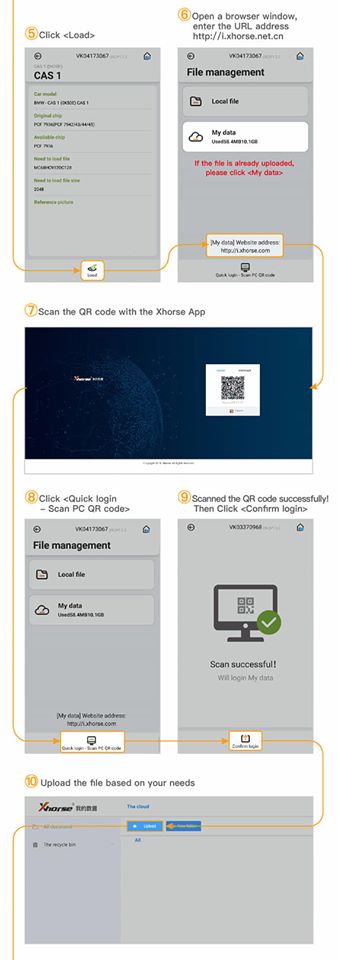
5.  Click on “Load”.
6.  Open a browser window, enter the URL address http://i.xhorse.com/#/(http://i.xhorse.net.cn/#/is for Chinese users)
7.  Scan the QR code with the Xhorse App.
8.  Click on “Quick login – scan PC QR code”.
9.  Scanned the QR code successfully, then click on “Confirm login”.
10.  Upload the file based on your needs.
Xhorse-Key-Tool-Max-File-Make-Key-Funtion-Use-Tips-2

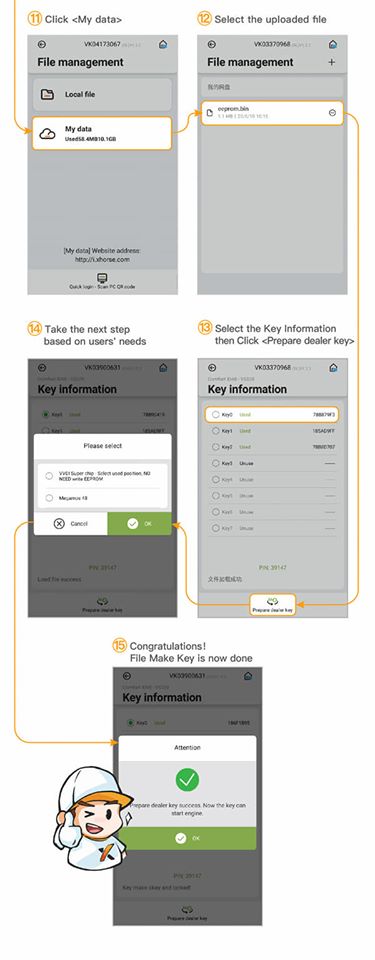
11.  Click on “My data”.
12.  Select the uploaded file.
13.  Select the key information then click on “Prepare dealer key”.
14.  Take the next step based on users’ needs.
15.  Congratulations! File make key is now done.
Xhorse-Key-Tool-Max-File-Make-Key-Funtion-Use-Tips-3

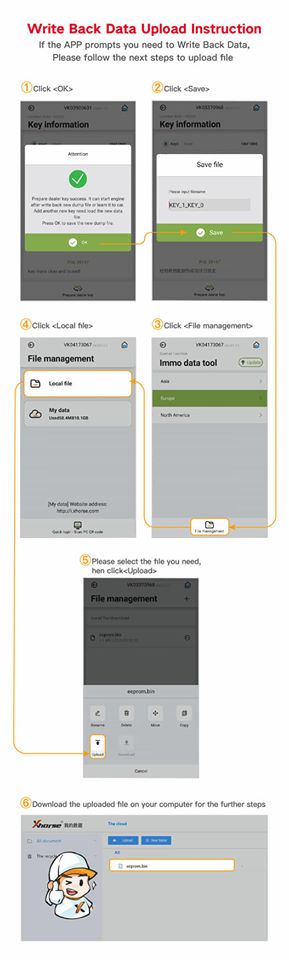
Write back data upload instruction:

If the APP prompts you need to write back data, please follow the next steps to upload file.

1.  Click on “OK”.
2.  Click on “Save”.
3.  Click on “File management”.
4.  Click on “Local file”.
5.  Please select the file you need, then click on “upload”.
6.  Download the uploaded file on your computer for the further steps.
Xhorse-Key-Tool-Max-File-Make-Key-Funtion-Use-Tips-4


Comments

Popular posts from this blog

How to setup BMW ISTA/P Loader for ICOM A2 ENET cable K+DCAN adapter

The text here, as a user manual of BMW ISTA/P Loader / ICOM Emulator,  is aimed to help those puzzled with ISTA/P Loader setup for  ICOM A2 , ENET cable, K+DCAN  USB interface. Note: all info here not original, shared by a forum member So try at your own risk! Main content: Part 1 – Compatible device Part 2 – Latest ISTA/P Loader update information Part 3 – How to install ISTA/P Loader v4.x Part 4 – How to use  ISTA/P loader with ICOM A2, K+DCAN cable, ENET cable Part 5 – How to shut down ISTA/P Part 1 – Compatible device: ISTA/P Loader compatible with ICOM A2 (OEM or clone), K+DCAN USB and ENET   Part 2 – Latest ISTA/P Loader update information: NEWEST – ISTA/P Loader V4.8  update info: Free download BMW ISTA-P Loader V4.8.7 to get all new info yourself …… ISTA/P Loader V4.2 update info: Custom resolution option added Improved detection of bmw scan tool ISTA-P install location. Improved compatibility with windows 10 Code...

JOHN DEERE DIAGNOSTIC OPTIONS

JOHN DEERE DIAGNOSTICS John Deere has recently been in the news because of their strict opposition to allowing farmers, equipment owners, and repair shops access to the information they need to repair and maintain their vehicles. If you read the main stream news, you would be left to believe that John Deere diagnostic with a computer is impossible. Well, we are here to help dispel that myth and give some more exposure to some tools that actually do perform diagnostics on John Deere. There are actually several solutions in the market, some of which we will cover in this post. JOHN DEERE EDL AND SERVICE ADVISOR The very best solution in the market is what the dealers use. John Deere dealers use a combination of PC-based computer with two critical components – John Deere Service Advisor software and the John Deere EDL v3 Adapter . The EDL v3 adapter looks like the picture shown below. It comes with a hard carry case, the adapter itself, a 9-pin connector, and the USB ca...

PIWIS Tester Technical Information

WF51 – Re-coding Instrument Cluster (Workshop Campaign) Important: CRITICAL WARNING – This campaign includes steps where control unit(s) in the vehicle will be programmed with the PIWIS Tester. The vehicle voltage must be maintained between 13.5 volts and 14.5 volts during this programming. Failure to maintain this voltage could result in damaged control unit(s). Damage caused by inadequate voltage during programming is not a warrantable defect. The technician must verify the actual vehicle voltage in the PIWIS Tester before starting the campaign and also document the actual voltage on the repair order. Please refer to Equipment Information EQ1401 for a list of suitable battery chargers/power supplies which should be used to maintain vehicle voltage. Model Year: 2015 Vehicle Type: Cayenne S E-Hybrid (92A) Concerns: Instrument cluster Information: The instrument cluster on the affected vehiclesmay have been coded using an incorrect coding rule. As a result, there...